Download
Download OpenCore Legacy Patcher safely
There is exactly one official place to get OpenCore Legacy Patcher: its GitHub releases page. It is free. This page explains which file to pick, which version you need, and how to check that what you downloaded is genuine.
On this page 7 sections
Short answer
Download OpenCore-Patcher.pkg from github.com/dortania/OpenCore-Legacy-Patcher/releases. Use the latest stable version (2.5.1) for macOS Big Sur to Sequoia. For macOS Tahoe you need version 3.0.0 (newest build: 3.0.0-rc.5, a pre-release). Open the .pkg and follow the installer. We do not host copies, and you should not download it anywhere else.
Both buttons open the official GitHub release page in a new tab. Nothing is downloaded from oclp.dev.
The official download, and the only one
The OpenCore Legacy Patcher developers list three official links: the GitHub repository, the documentation at dortania.github.io, and dortania.com, a back end that is not meant for people to visit (issue #1120). Releases are published only on GitHub.
That matters because copies circulate. In 2023 the developers publicly warned about a look-alike website that claimed to be official, and they ask people not to re-upload or download the app from other sites, since a modified copy cannot be trusted. Download sites such as MacUpdate and MajorGeeks list it without the developers' approval. If a site asks you to pay, to install a “downloader”, or to disable security features before downloading, leave it.
Which file you need
Each release on GitHub lists three files. You only need the first.
| File | Size (3.0.0-rc.5) | What it is | Do you need it? |
|---|---|---|---|
OpenCore-Patcher.pkg | 967 MB | The installer for the app. It installs OpenCore Legacy Patcher and its helper tool. | Yes |
AutoPkg-Assets.pkg | about the same | Extra assets the app downloads by itself when you create a macOS installer: they go onto the USB drive, so OCLP installs and root-patches automatically after macOS installs. | No, the app fetches it |
OpenCore-Patcher-Uninstaller.pkg | 0.2 MB | Removes the app and its helper tool. It does not remove OpenCore from your EFI partition or revert root patches. | Only to uninstall the app |
There is no .dmg and no .app.zip any more: the app zip was deprecated in 1.5.0 and removed from releases in 2.3.0 (changelog). There is no Windows .exe either: OCLP is a Mac app. If you see any of those offered as “OpenCore Legacy Patcher”, it is not from the developers.
Stable 2.5.1 or 3.0.0?
| You want | Use | Why |
|---|---|---|
| macOS Big Sur, Monterey, Ventura, Sonoma or Sequoia | 2.5.1 (stable, September 19, 2026) | Released and supported. Sequoia patches are mature. |
| macOS Tahoe | 3.0.0 (newest: 3.0.0-rc.5, October 28, 2026) | Tahoe support exists only in 3.0.0. Until 3.0.0 is final, its builds are marked “pre-release” on GitHub. |
| You are already patched and things work | Stay on your version | Update the app before a major macOS upgrade, not in between. See Updating. |
Nightly builds are not releases
The developers also publish untested “nightly” builds from their build server. They ask people not to share links to those binaries and not to use them on a main machine. This guide never links to them.Check that the download is genuine
Every release .pkg is signed with the developers' Apple Developer ID and notarized by Apple, so macOS checks it when you open it. You can check it yourself in Terminal before you install:
pkgutil --check-signature ~/Downloads/OpenCore-Patcher.pkgLook for Status: signed by a developer certificate issued by Apple for distribution, Notarization: trusted by the Apple notary service, and the certificate Developer ID Installer: Mykola Grymalyuk (S74BDJXQMD) (Mykola Grymalyuk is OCLP's lead developer, khronokernel). That is exactly what our test run printed for 3.0.0-rc.5. The package has no stapled ticket, so macOS confirms the notarization online the first time you open it. Then compare the file's SHA-256 with the value we computed from the GitHub file:
shasum -a 256 ~/Downloads/OpenCore-Patcher.pkg| Release | File | Size | SHA-256 |
|---|---|---|---|
| 2.5.1 | AutoPkg-Assets.pkg | 738.1 MB | f35d9fb9308af3f00ce9d1788e559c9c084f82a46112e914953311e4b7a3121d |
| 2.5.1 | OpenCore-Patcher-Uninstaller.pkg | 0.2 MB | a61b1119b730a83ae7ca2dbdd6e6a1827c550731332c6783ebbe8591fbe8171a |
| 2.5.1 | OpenCore-Patcher.pkg | 738.1 MB | e4b65f633f97818b26135ba19e528e59dd100a986cf11bdcde62ef51f1e1603a |
| 3.0.0-rc.5 | AutoPkg-Assets.pkg | 967.0 MB | a965871a838931c2a0cfeb9504398976b5caf142fff05249225d4f3bcd2e8054 |
| 3.0.0-rc.5 | OpenCore-Patcher-Uninstaller.pkg | 0.2 MB | 13c79fa3dad4d345de185f489f3ac69f9af5961c1055060b84d3cefe113e1ebe |
| 3.0.0-rc.5 | OpenCore-Patcher.pkg | 967.0 MB | 0a604e738b83ca36a7392cad20e329057033122261db9dc4d8e9135fc5d8430c |
Computed by us on 2026-11-05 from the files on GitHub (run 42051156326).
Install the app
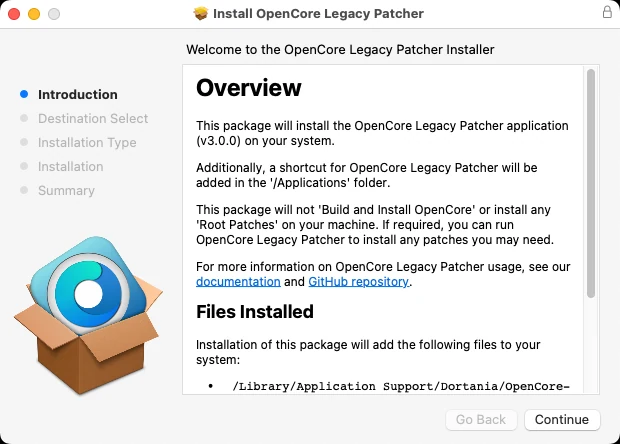
- Double-click
OpenCore-Patcher.pkgand follow the installer. It asks for your password once. - The app goes to
/Library/Application Support/Dortania/OpenCore-Patcher.app, with a shortcut in Applications, and a privileged helper tool is installed so the app does not ask for your password at every step. - Open OpenCore-Patcher from Applications. Version 3.0.0 starts with a welcome screen listing the project's contributors.
Continue with How to install OpenCore Legacy Patcher.
Older versions
Every release since 2020 is still on GitHub. You rarely need an old one; reasons people do:
- You run an old macOS that a newer OCLP no longer patches the same way, and you want to keep the exact patches you have. Generally, newer OCLP versions support all macOS versions from Big Sur, so update instead.
- You are troubleshooting a regression. Check the release notes first.
| Version | Date | Type | Installer downloads |
|---|---|---|---|
| 3.0.0-rc.5 | 2026-10-28 | Pre-release | 33,369 |
| 3.0.0-rc.3 | 2026-10-08 | Pre-release | 80,845 |
| 3.0.0-rc.2 | 2026-10-04 | Pre-release | 19,691 |
| 3.0.0-rc.1 | 2026-10-04 | Pre-release | 3,477 |
| 2.5.1 | 2026-09-19 | Stable | 551,341 |
| 2.5.0 | 2026-09-08 | Stable | 243,980 |
| 2.4.1 | 2025-09-01 | Stable | 2,950,104 |
| 2.4.0 | 2025-05-12 | Stable | 1,168,571 |
| 2.3.2 | 2025-04-04 | Stable | 693,468 |
| 2.3.1 | 2025-04-02 | Stable | 87,919 |
| 2.3.0 | 2025-03-31 | Stable | 59,746 |
| 2.2.0 | 2024-12-11 | Stable | 730,842 |
Common questions
Is OpenCore Legacy Patcher free?
Is there an OpenCore Legacy Patcher download for Windows?
Is OpenCore Legacy Patcher on Homebrew or the App Store?
Do I need to download macOS separately?
Which version supports macOS Tahoe?
Keep going
Something wrong or out of date on this page? Email hello@oclp.dev and we will fix it (see our corrections policy).